
Learning programming can seem difficult when you are just starting. You may see lines of code, unfamiliar technical terms, errors, and complicated software and wonder where to begin.
The truth is that programming becomes much easier when you follow the right learning path.
You do not need to learn every programming language. You do not need to memorize hundreds of commands. And you certainly don’t need to become an expert before writing your first program.
What you need is a clear roadmap, consistent practice, patience, and the willingness to solve problems.
In this guide, you’ll learn how to learn programming step by step, from complete beginner to advanced developer.
What Is Programming?
Programming is the process of giving instructions to a computer so that it can perform specific tasks.
These instructions are written using programming languages such as:
- Python
- JavaScript
- PHP
- C++
- Java
- C#
- Go
- Swift
For example, a simple Python program can tell a computer to display a message:
print("Hello, World!")Although this example is simple, it demonstrates the fundamental idea of programming:
You write instructions → the computer executes them → you get a result.
Why Should You Learn Programming?
Programming is no longer useful only for professional software developers.
Learning programming can help you build:
- Websites
- Mobile applications
- Desktop applications
- Games
- Business systems
- APIs
- Automation tools
- Artificial intelligence applications
- Data analysis solutions
- E-commerce platforms
It can also open opportunities in:
- Software engineering
- Web development
- Mobile development
- Data analysis
- Artificial intelligence
- Cybersecurity
- DevOps
- Freelancing
- Technical entrepreneurship
The important thing is to choose a direction instead of trying to learn everything simultaneously.
Step 1: Understand How Computers and Programming Work
Before jumping into complicated programming languages, understand the basic concepts behind software.
Learn what these terms mean:
- Computer program
- Programming language
- Source code
- Compiler
- Interpreter
- Algorithm
- Variable
- Function
- Database
- Input
- Output
- Software
- Hardware
You don’t need to become an expert in computer science at this stage.
Your goal is simply to understand how instructions move from your code to a working program.
Step 2: Choose One Programming Language
One of the biggest mistakes beginners make is trying to learn several programming languages at once.
You might start with:
Python
then move to:
JavaScript
then:
C++
then:
Java
and eventually become confused.
Don’t do this.
Choose one language and stay with it.
For beginners, Python is an excellent general-purpose option because its syntax is relatively readable and it can be used in many areas.
If your main goal is web development, you could start with:
HTML → CSS → JavaScript
If your goal is backend web development, you could eventually learn:
PHP → MySQL → JavaScript
If your goal is software engineering or systems programming, languages such as:
C++ or Java
may be appropriate.
The best programming language is therefore largely determined by what you want to build.
Step 3: Learn the Fundamentals
Once you’ve chosen your first language, focus on programming fundamentals.
These concepts appear in almost every programming language.
Variables
Variables store information.
name = "Alex"
age = 25
Data Types
Learn common types such as:
- Strings
- Integers
- Floats
- Booleans
- Lists
- Arrays
- Objects
Operators
Understand:
- Arithmetic operators
- Comparison operators
- Logical operators
- Assignment operators
Conditions
Learn how programs make decisions.
if age >= 18:
    print("Adult")
else:
    print("Minor")
Loops
Learn how to repeat operations.
for i in range(5):
    print(i)
Functions
Functions allow you to organize reusable logic.
def greet(name):
    print("Hello", name)

greet("Alex")
These fundamentals are the foundation upon which more advanced programming concepts are built.
Step 4: Learn How to Solve Problems
This is where many beginners misunderstand programming.
Programming is not primarily about memorizing syntax.
It is about solving problems.
For example:
“How can I calculate the average of five numbers?”
Break the problem into smaller steps:
- Get five numbers.
- Add them together.
- Divide the result by five.
- Display the answer.
This is called problem decomposition.
The better you become at breaking large problems into smaller problems, the better programmer you become.
Step 5: Learn Algorithms and Logic
Once you understand the basics, start learning algorithms.
An algorithm is essentially a sequence of steps used to solve a problem.
Start with simple concepts such as:
- Searching
- Sorting
- Counting
- Filtering
- Recursion
- Iteration
- Basic data structures
Then progress to:
- Arrays
- Linked lists
- Stacks
- Queues
- Hash tables
- Trees
- Graphs
You don’t need to master advanced algorithms immediately.
Start simple and increase the difficulty gradually.
Step 6: Practice by Building Small Projects
This is probably the most important step.
Don’t spend six months watching programming tutorials without building anything.
After learning a concept, use it.
Beginner projects
Build:
- Calculator
- Number guessing game
- To-do list
- Simple quiz
- Temperature converter
- Digital clock
- Basic calculator
- Student grade calculator
These projects teach you how to turn concepts into working applications.
Step 7: Move to Real-World Projects
Once you are comfortable with small projects, increase the complexity.
Build applications such as:
Beginner–Intermediate
- Expense tracker
- Blog
- Personal portfolio
- Inventory system
- Student management system
- Contact management system
Intermediate
- E-commerce website
- Authentication system
- Job portal
- Booking system
- Learning management system
- Customer management system
Advanced
- SaaS application
- REST API
- AI-powered application
- Real-time messaging system
- Enterprise management system
- Distributed application
The principle is:
Project difficulty should increase as your skills increase.
Step 8: Learn Databases
Most useful applications need to store information.
That’s where databases become important.
Start with SQL and understand concepts such as:
- Tables
- Rows
- Columns
- Primary keys
- Foreign keys
- Relationships
- CRUD operations
- SELECT
- INSERT
- UPDATE
- DELETE
- JOIN
Popular databases include:
- MySQL
- PostgreSQL
- SQLite
- Microsoft SQL Server
- MongoDB
For beginners, learning SQL and a relational database is an excellent foundation.
Step 9: Learn Git and GitHub
Once you start building serious projects, you need to learn version control.
Start with:
Git
Then learn how to use:
GitHub
Important commands and concepts include:
git init
git add
git commit
git push
git pull
git clone
git branch
git merge
Git helps you track changes to your code and makes collaboration much easier.
GitHub can also become your public programming portfolio.
Step 10: Learn Debugging
Every programmer encounters errors.
Even experienced developers make mistakes.
The difference is that experienced developers know how to investigate those errors.
When something doesn’t work:
- Read the error message.
- Identify the file and line.
- Understand what the error means.
- Check your assumptions.
- Test the code.
- Search documentation.
- Fix one problem at a time.
Don’t simply copy an error message into an AI tool and paste the answer without understanding it.
Use AI as a programming assistant, not as a replacement for your thinking.
Step 11: Learn How to Read Documentation
Professional programmers don’t memorize everything.
They know how to find information.
Learn to use official documentation for the languages, frameworks, libraries and tools you work with.
When you encounter a new function or library, ask:
What does it do?
What parameters does it accept?
What does it return?
What are the limitations?
This skill becomes increasingly important as you advance.
Step 12: Choose a Programming Career Path
After learning the fundamentals, choose a specialization.
Web Development
Typical path:
HTML → CSS → JavaScript → Frontend Framework → Backend → Database → APIs
Possible careers:
- Frontend Developer
- Backend Developer
- Full-Stack Developer
Mobile Development
You could explore:
- Flutter
- React Native
- Kotlin
- Swift
Build applications for:
- Android
- iOS
Data Science
Typical areas include:
- Python
- Statistics
- Data analysis
- Pandas
- NumPy
- Data visualization
- Machine learning
Artificial Intelligence
Progress toward:
Python → Mathematics → Data → Machine Learning → Deep Learning → AI Applications
Cybersecurity
Build a foundation in:
- Networking
- Linux
- Operating systems
- Programming
- Web security
- Cryptography
- Security testing
Always practice security techniques in legal and authorized environments.
DevOps and Cloud
Explore:
- Linux
- Git
- Docker
- CI/CD
- Cloud platforms
- Kubernetes
- Infrastructure automation
Step 13: Learn Software Engineering
Programming and software engineering are not exactly the same thing.
Programming focuses heavily on writing code.
Software engineering goes further.
You should eventually learn:
- Software architecture
- Design patterns
- Testing
- Documentation
- Version control
- Code quality
- Security
- Deployment
- Project management
- Requirements analysis
- System design
This is where you begin moving from “someone who can code” toward “someone who can engineer software.”
Step 14: Build a Portfolio
Don’t wait until you have a job before building your portfolio.
Create projects that demonstrate what you can do.
Your portfolio can include:
- Personal website
- GitHub repositories
- Project demonstrations
- Case studies
- Technical articles
- Documentation
- Applications you’ve built
Instead of saying:
“I know Python.”
You can demonstrate:
“I built this Python application.”
That is much stronger evidence of your ability.
Step 15: Start Working on Real Problems
Eventually, move beyond tutorial projects.
Find real problems around you.
For example:
Problem: A small business manages customers using notebooks.
Solution: Build a customer management system.
Problem: Students struggle to track assignments.
Solution: Build a student task management application.
Problem: A business manually manages inventory.
Solution: Build an inventory management system.
This is where programming becomes extremely valuable.
How Long Does It Take to Learn Programming?
There is no fixed timeline.
Your progress depends on:
- Time available
- Consistency
- Learning method
- Previous experience
- Difficulty of your chosen field
- Amount of practical work
A person who practices 1–2 hours every day can make significant progress over several months.
But becoming genuinely proficient requires continued practice and real-world experience.
Don’t ask:
“How many months until I’m a programmer?”
Ask:
“What can I build today that I couldn’t build last month?”
That is a better measure of progress.
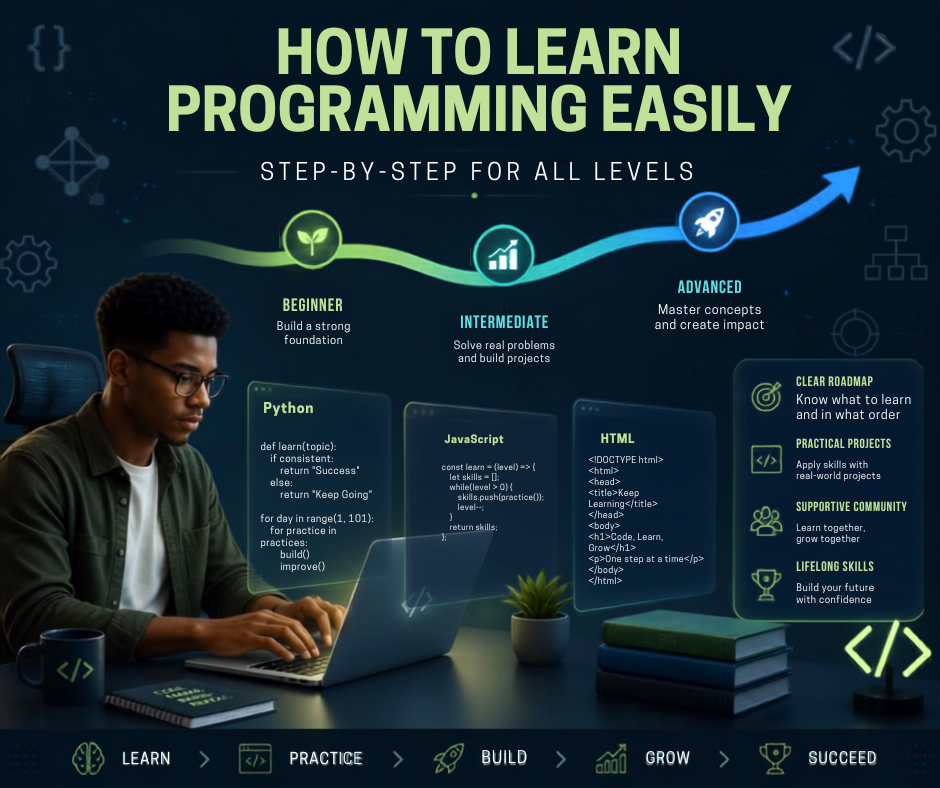
A Simple Programming Roadmap
Here’s a practical progression you can follow:
Level 1 — Beginner
Learn:
- Programming concepts
- Variables
- Data types
- Conditions
- Loops
- Functions
- Basic debugging
Build 5–10 small projects.
↓
Level 2 — Intermediate
Learn:
- Data structures
- Algorithms
- Object-oriented programming
- Databases
- APIs
- Git/GitHub
Build complete applications.
↓
Level 3 — Advanced
Learn:
- Architecture
- Testing
- Security
- Performance
- Design patterns
- System design
- Deployment
Build production-quality applications.
↓
Level 4 — Professional
Develop:
- Specialization
- Real-world experience
- Portfolio
- Team collaboration
- Code review skills
- Communication
- Problem-solving
Work on real systems and real users.
The Best Way to Practice Programming
Use the 30–30–30 method if you’re struggling to stay consistent.
30% — Learn
Watch tutorials, read documentation and study concepts.
30% — Practice
Write small exercises without following the tutorial.
40% — Build
Work on your own project.
For example, during a two-hour study session:
36 minutes → Learning
36 minutes → Exercises
48 minutes → Project
This keeps your learning practical.
10 Mistakes New Programmers Should Avoid
1. Learning Too Many Languages
Master one foundation before adding another language.
2. Watching Tutorials Without Coding
Watching someone program isn’t the same as programming.
3. Copying Code Without Understanding It
Understand what the code does.
4. Giving Up When You See Errors
Errors are part of programming.
5. Avoiding Projects
Projects turn knowledge into ability.
6. Comparing Your Progress With Others
Everyone starts from a different point.
7. Ignoring Fundamentals
Frameworks change. Fundamentals remain useful.
8. Avoiding Documentation
Documentation is part of professional development.
9. Depending Completely on AI
AI can accelerate learning, but you still need to understand the code.
10. Expecting Fast Results
Programming is a skill developed through repetition.
Can You Learn Programming Without a Computer Science Degree?
Yes.
A degree can provide structured education and a broad theoretical foundation, but programming skills can also be developed through:
- Self-study
- Online courses
- Bootcamps
- Books
- Documentation
- Open-source projects
- Personal projects
- Internships
- Practice
What matters is what you can actually understand and build.
How to Learn Programming Faster
If you want to accelerate your progress, follow these principles:
Learn Less, Practice More
Don’t try to learn 20 technologies simultaneously.
Build While Learning
Every major concept should lead to a practical exercise.
Make Mistakes
Debugging teaches you how software actually works.
Read Other People’s Code
Study well-written open-source projects.
Teach What You Learn
Explaining a concept forces you to understand it deeply.
Build Consistently
Even 30–60 minutes every day can be more effective than studying for 10 hours once a month.
Final Thoughts
Learning programming is not about becoming perfect at coding.
It is about developing the ability to think logically, solve problems, understand systems and create useful solutions with technology.
Start with one language.
Learn the fundamentals.
Practice every day.
Build small projects.
Build bigger projects.
Learn databases and version control.
Choose a specialization.
Build a portfolio.
Then solve real-world problems.
Most importantly, don’t wait until you feel ready to start building.
Start with something simple.
Your first project may be ugly. Your code may contain errors. You may not understand everything.
That’s normal.
Every experienced programmer once wrote their first program.
Learn → Practice → Build → Fail → Debug → Improve → Repeat.
That is the real path to becoming a programmer.
Quick Programming Roadmap
Beginner:
Programming fundamentals → One language → Small exercises
Intermediate:
OOP → Algorithms → Databases → Git → APIs → Projects
Advanced:
Architecture → Testing → Security → Performance → Deployment
Professional:
Specialization → Portfolio → Real-world projects → Collaboration → Continuous learning
Start small. Stay consistent. Build relentlessly.
That is how you learn programming.